
Quick picks: Emporia Vue 3 is the strongest choice if you want whole-home plus circuit-level monitoring from the electrical panel. Shelly Pro 3EM v2 is the best fit for local-first users, Home Assistant-style integrations and professional single- or three-phase metering. Emporia Vue Utility Connect is the easiest whole-home option if your utility and smart meter support it because it avoids panel work entirely. Kasa KP125M is the most practical Wi-Fi/Matter plug-level monitor for individual appliances. Eve Energy is the stronger Thread/Matter plug-level choice when local control and Thread are already part of the home.
Research disclosure: this buying guide is based on current manufacturer specifications, support documentation and product availability checked in October 2026. WesternTechy has not hands-on tested every monitor in this comparison. We do not score measurement accuracy beyond published specifications, and we do not present utility-billing estimates as revenue-grade measurement.
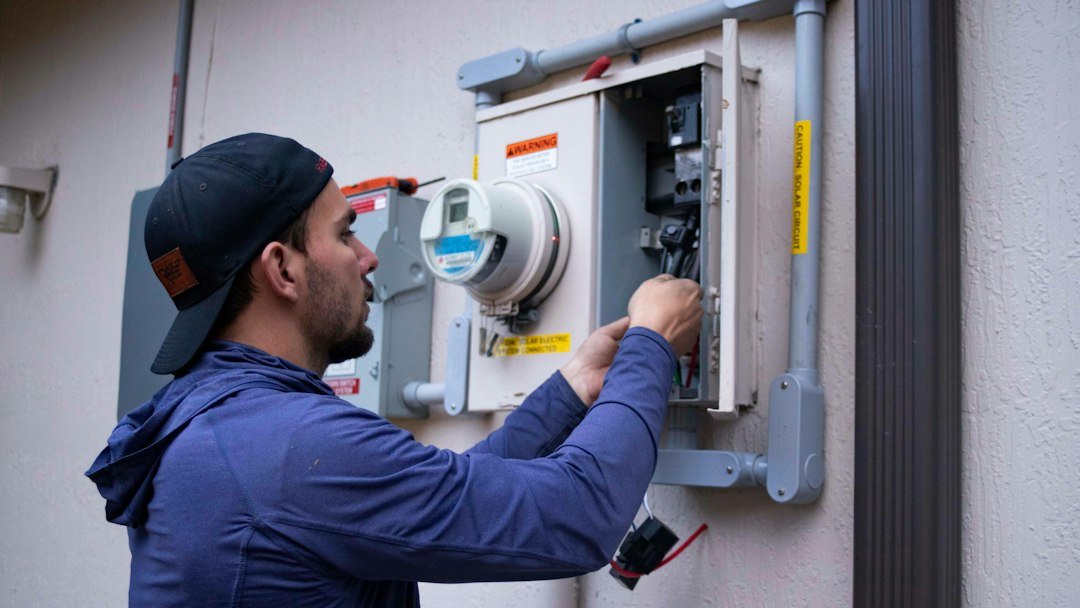
Safety note: panel-mounted energy monitors are not ordinary plug-in smart-home accessories. Their current transformers and power connections are installed around or inside electrical equipment where hazardous voltages can remain present even when a main breaker is switched off. Follow the manufacturer’s instructions and use a qualified electrician whenever the product or local rules require one.
Best home energy monitors in 2026
| Pick | What it measures | Installation | Connectivity | Best for |
|---|---|---|---|---|
| Emporia Vue 3 | Whole home plus up to 16 branch circuits | Electrical panel with CT sensors | 2.4 GHz Wi-Fi and Ethernet | Detailed circuit-level monitoring and solar-aware homes |
| Shelly Pro 3EM v2 | Up to 3 phases, import/export, power and energy | DIN rail with CT sensors | Wi-Fi, LAN, Bluetooth, local APIs | Local-first systems, three-phase service and advanced integrations |
| Emporia Vue Utility Connect | Whole-home total from compatible utility smart meter | Wall outlet, no panel work | Zigbee HAN to meter, 2.4 GHz Wi-Fi to app | Supported utility customers who want the easiest install |
| Kasa KP125M | One plug-in appliance | Plug-in smart outlet adapter | 2.4 GHz Wi-Fi, Matter | Appliance-level monitoring without electrical work |
| Eve Energy | One plug-in appliance | Plug-in smart outlet adapter | Thread, Matter | Thread households and local-first plug-level monitoring |
The products above do different jobs. A plug-level monitor cannot tell you what the whole panel is doing, and a whole-home total does not automatically tell you which circuit caused the spike. Choose the measurement depth first, then the brand.
Best overall for circuit-level monitoring: Emporia Vue 3
Emporia Vue 3 is the strongest general recommendation when you want to see both the total load entering the home and the circuits that are responsible for it.
Emporia’s current technical documentation lists three 200A current-measurement channels for mains and up to sixteen 50A branch-circuit channels. The published measurement accuracy is ±2%. The Vue 3 supports 2.4 GHz Wi-Fi and also adds 10/100 Ethernet, which is useful when the electrical panel is in a location where Wi-Fi is unreliable.
The standard residential Vue 3 is intended for common single-phase and split-phase systems, and Emporia also sells a dedicated three-phase version. The platform can monitor solar production and net usage when installed in a supported configuration.
Why choose Emporia Vue 3
- Whole-home and individual-circuit monitoring in one system
- Up to 16 branch-circuit CT sensors
- Published ±2% measurement accuracy
- Wi-Fi plus wired Ethernet
- Solar monitoring support
- Energy alerts, budgets and historical analysis in the Emporia app
- Current 2026 product line remains actively sold and supported
What the branch sensors change
A whole-home monitor can show that the house suddenly jumped by 3 kW. Circuit sensors can show that the jump came from the clothes dryer, water heater, heat pump or another monitored circuit.
That is more deterministic than trying to infer every appliance from one aggregate power waveform.
The trade-off is installation complexity. A Vue with sixteen branch sensors can create a crowded panel, and every CT has to be installed on the correct conductor and mapped to the correct circuit in the app.
Do not buy more sensors than your question requires
You do not need to monitor every breaker just because the monitor supports sixteen channels.
A practical first set might include:
- HVAC or heat pump
- electric water heater
- dryer
- range or oven
- EV charger
- solar or battery equipment
- one or two unexplained high-usage circuits
Use the remaining channels later if the data shows a reason.
Manufacturer sources: Emporia product documentation, Emporia Vue 3 product page, and Vue 3 technical specifications.
Best local-first and three-phase pick: Shelly Pro 3EM v2
Shelly Pro 3EM v2 is the most technically flexible monitor in this shortlist.
The current product is a DIN-rail-mounted meter that can monitor single-phase or three-phase installations with three included 120A current transformers. Shelly publishes 1% active-energy measurement accuracy based on its internal validation and Class B active-energy compliance claims.
The important difference is not only measurement. Shelly exposes local control and integration paths that are useful in advanced smart homes. The Pro 3EM can operate on the local LAN, includes Ethernet and Wi-Fi, and supports integrations through mechanisms such as MQTT, HTTP, WebSocket and device scripting.
Why choose Shelly Pro 3EM v2
- Single-phase or three-phase monitoring
- Three 120A CTs included
- Four-quadrant measurement for imported and exported energy
- Useful for photovoltaic systems
- Wi-Fi and wired LAN
- Local web interface
- MQTT, HTTP, WebSocket and scripting support
- On-device historical storage
- Matter-upgradable according to the current product page
Why local storage matters
Shelly’s current documentation says the device stores at least 45 days of one-minute data locally, while current product marketing describes up to 60 days of on-device history.
The practical point is that the monitor is not relying only on a cloud dashboard to retain recent measurements. That can matter in Home Assistant, local-energy dashboards and installations where you want direct access to meter data on the LAN.
This is not the easiest DIY choice
Pro 3EM v2 belongs in an electrical enclosure on DIN rail and has direct voltage connections in addition to the CTs. That makes it a better fit for qualified installers and experienced integrators than for someone looking for a five-minute consumer gadget.
It also does not contain a built-in load-switching relay. Shelly documents separate add-on/contactor options when the goal is to act on measured load.
Manufacturer sources: Shelly Pro 3EM v2 product page and Shelly Pro 3EM technical documentation.
Best no-panel option where supported: Emporia Vue Utility Connect
Vue Utility Connect solves a completely different problem from the Vue 3.
Instead of installing current transformers in the electrical panel, it reads whole-home usage wirelessly from a compatible utility smart meter using the meter’s Zigbee Home Area Network. The Utility Connect itself plugs into a normal wall outlet and sends data to the Emporia app over 2.4 GHz Wi-Fi.
That makes it especially appealing for renters, apartments and homeowners who do not want panel work.
Why choose Utility Connect
- No electrical-panel installation
- No electrician required for the device itself
- Whole-home energy data from the utility smart meter
- Near-real-time updates, roughly every 30 seconds according to Emporia
- Historical usage, budgets and goals in the Emporia app
- Low-commitment option for supported renters and homeowners
The utility requirement is the deal-breaker
Utility Connect only works when the electric utility supports a compatible Home Area Network and allows the customer to register a third-party device.
Emporia’s May 2026 support list includes participating utilities in parts of California, Ohio, Pennsylvania, Vermont and Illinois, including PG&E, Southern California Edison, selected FirstEnergy companies, PPL, Duquesne Light, Burlington Electric, Green Mountain Power and ComEd.
The list can change. Check Emporia’s live utility-compatibility page before buying.
You get whole-home data, not branch circuits
Utility Connect sees the total being reported by the smart meter. It does not separately measure the water-heater circuit, dryer circuit or EV charger.
If the goal is to identify exactly which circuits drive the bill, Vue 3 is the more appropriate Emporia product.
Manufacturer sources: How Vue Utility Connect works and current supported utilities.
Best Wi-Fi/Matter plug-level monitor: Kasa KP125M
Kasa KP125M is the practical choice when the question is not “How much power does my house use?” but “How much power does this appliance use?”
It is a Matter-certified smart plug with energy monitoring, scheduling and remote control. TP-Link’s Kasa app provides real-time and historical usage views, and the product supports entering an electricity rate for cost estimates, including time-of-use billing structures in the Kasa energy-monitoring workflow.
In August 2026, TP-Link released firmware adding Matter 1.3 energy reporting to the KP125M V1 line. TP-Link notes that not every Matter platform fully exposes those energy attributes yet; its current release notes specifically identify SmartThings and Home Assistant as verified examples.
Why choose Kasa KP125M
- No panel access
- Measures one appliance directly
- Matter-certified
- Historical and real-time energy data in the Kasa app
- Time-of-use rate support for bill estimates
- Useful for refrigerators, dehumidifiers, entertainment equipment and other plug loads
Plug-level measurement is often the fastest diagnostic tool
If you suspect one appliance is expensive to run, a smart plug can answer the question more directly than a whole-home monitor.
For example, you can measure:
- daily refrigerator consumption
- how often a dehumidifier cycles
- standby consumption of an entertainment setup
- energy used by a portable air conditioner
- the cost of running a space heater under a specific schedule
Stay within the plug’s electrical rating and the connected-appliance requirements. Do not use a smart plug with equipment the manufacturer excludes or with loads that exceed the device rating.
Manufacturer sources: Kasa KP125M product page and KP125M firmware release notes.
Best Thread/Matter plug-level monitor: Eve Energy
Eve Energy is the plug-level alternative for homes already built around Matter over Thread.
The current U.S. and Canada model is rated for 120V, 15A and up to 1,800W. It connects over Thread and requires a compatible Matter Controller with Thread Border Router functionality.
Eve’s own apps expose energy-consumption and projected-cost information. Since the 2025 energy-reporting update, Eve Energy can also expose standardized Matter energy data to platforms that implement those Matter features. Eve specifically identifies Home Assistant and SmartThings among platforms with energy-management support, while noting that feature support still differs across ecosystems.
Why choose Eve Energy
- Matter over Thread rather than Wi-Fi
- 15A / 1,800W U.S. rating
- Energy and projected-cost views in the Eve app
- Matter energy reporting
- Local-first architecture with no need for an Eve cloud account for basic smart-home communication
- Can strengthen a Thread mesh because it is a mains-powered Thread router
Thread infrastructure is required
Eve Energy is not the right first smart-home purchase if you have no Matter Controller or Thread Border Router.
A compatible hub already in the home can make Eve Energy a clean fit. Buying a new hub only to measure one appliance usually makes less sense than using a direct Wi-Fi monitor.
Manufacturer sources: Eve Energy product page and Matter energy-reporting update.
Why Sense is not a current buying pick in 2026
Older energy-monitor roundups often recommend the Sense Home Energy Monitor. That recommendation needs an update.
Sense permanently ended consumer monitor sales on December 31, 2025, or earlier if inventory ran out. The company shifted its focus toward Sense software integrated into next-generation utility smart meters.
Existing Sense monitor owners are still supported, and Sense says current hardware will continue receiving software and security updates. That is good news for owners.
It does not make used Sense hardware a strong new-purchase recommendation. Sense states that resale invalidates any remaining product warranty, and new consumer monitor hardware is no longer being manufactured for retail sale.
If you already own a Sense monitor, keep using it if it meets your needs. If you are buying from scratch in 2026, choose an actively sold monitor unless there is a very specific reason to buy used equipment.
Manufacturer source: Sense support statement on the end of consumer monitor sales.
Whole-home, circuit-level or plug-level: which measurement do you actually need?
Choose whole-home monitoring when you want the big picture
A whole-home meter is useful for questions such as:
- How high is my overnight base load?
- When does household demand peak?
- How much solar am I importing or exporting?
- Does the home exceed a target demand level?
Utility Connect and panel monitors can answer those questions without requiring every appliance to be instrumented.
Choose circuit-level monitoring when you need attribution
Circuit-level monitoring is better when you need to know whether HVAC, water heating, EV charging or another branch circuit is responsible for the load.
Emporia Vue 3 is the clearest consumer-focused example in this comparison.
Choose plug-level monitoring when you suspect a specific appliance
Plug monitors are ideal for appliances that connect through a normal receptacle and stay within the smart plug’s rating.
They are also easier to move. One plug can spend a week on the refrigerator, then a week on the dehumidifier, then move to the entertainment center.
Read Whole-Home vs Circuit-Level Energy Monitoring for the deeper measurement trade-offs.
Energy monitors are not automatically billing-grade meters
A consumer monitor can be accurate enough for household decisions without being legally suitable for utility billing, tenant submetering or financial settlement.
That distinction matters.
Use utility meter data when the question is your official bill. Use a consumer monitor to understand patterns, compare loads, detect waste and validate changes.
If you need revenue-grade metering, tenant billing or code-mandated submetering, use equipment and installation practices appropriate to that purpose.
Local data versus cloud dashboards
Energy monitoring creates a large amount of time-series data.
Before choosing a monitor, decide how important these questions are:
- Can I access recent measurements if the vendor cloud is unavailable?
- Can I export the data?
- Can Home Assistant or another local controller read it directly?
- How long is high-resolution history retained?
- Does the product require an account for normal monitoring?
Shelly Pro 3EM v2 is strongest in this comparison for local APIs and on-device storage.
Emporia provides strong consumer dashboards and exports but centers the experience around the Emporia platform.
Eve Energy provides a local Thread/Matter architecture at plug level. Kasa is simpler for Wi-Fi and Matter households.
Do not confuse energy monitoring with automatic savings
A monitor does not save electricity by itself.
It helps when the data changes a decision.
Examples include:
- finding a large overnight standby load
- moving EV charging to a cheaper time-of-use period
- discovering that an old dehumidifier runs almost continuously
- measuring whether a thermostat change actually reduced HVAC consumption
- confirming that a water heater or pool pump schedule changed demand
If you do not have a decision tied to the measurement, more granular data may become another dashboard you stop checking.
Best pick for renters
Start with a plug-level monitor or Utility Connect where the utility supports it.
Kasa KP125M and Eve Energy require no changes to the electrical panel. They can also move with you.
Utility Connect can provide whole-home data without panel modification, but only in supported utility territories with compatible smart meters.
A Vue 3 or DIN-rail meter normally belongs in a homeowner or property-controlled installation because it involves the electrical panel.
Use the Smart Homes for Renters & Apartments pathway before installing any property-level monitoring equipment.
Best pick for solar and export monitoring
Emporia Vue 3 and Shelly Pro 3EM v2 are the strongest options in this comparison when import and export matter.
Emporia supports solar-aware configurations within its Vue system.
Shelly Pro 3EM v2 supports four-quadrant measurement and is explicitly positioned for photovoltaic monitoring.
The right choice depends on whether you want a consumer app with circuit sensors or a more integration-oriented meter with local interfaces.
What we would choose for different situations
| Situation | Shortlist | Why |
|---|---|---|
| Whole-home plus multiple circuits | Emporia Vue 3 | Up to 16 branch sensors plus mains monitoring |
| Local-first or Home Assistant-heavy system | Shelly Pro 3EM v2 | LAN, local APIs, MQTT, scripting and on-device history |
| Three-phase service | Shelly Pro 3EM v2 or Emporia Vue 3 3-phase model | Both have current products intended for three-phase monitoring |
| Supported utility, no panel access | Emporia Utility Connect | Reads the smart meter without CT installation |
| One appliance, Wi-Fi household | Kasa KP125M | Simple plug-level monitoring and Matter support |
| One appliance, Thread household | Eve Energy | Matter over Thread plus energy reporting |
| Existing Sense owner | Keep the existing Sense if it works for you | Support continues, but new consumer monitor sales ended |
Before you buy: energy-monitor checklist
- Define the question. Whole-home trend, circuit attribution, or one appliance?
- Check electrical service. Single-phase, split-phase, three-phase, solar, generator or battery system.
- Check installation boundaries. Panel work may require a qualified electrician.
- Check sensor capacity. Count the circuits you genuinely want to monitor.
- Check networking. Wi-Fi, Ethernet, Thread or utility HAN requirements differ.
- Check data access. Cloud dashboard, local API, export and retention can matter as much as the hardware.
- Check utility compatibility. Utility Connect only works in supported HAN programs.
- Keep billing expectations realistic. Consumer monitoring is not automatically revenue-grade metering.
Related WesternTechy guides and tools
- Smart Home Energy & Cost hub
- Whole-Home vs Circuit-Level Energy Monitoring
- How to Measure Smart Home Energy Use
- Time-of-Use Electricity and Smart Home Automation
- Smart Electrical Panels and Load Management
- Smart Home Cost & Budget Calculator
Sources and editorial method
WesternTechy used current manufacturer product pages, technical specifications and support documentation. Prices are intentionally not used as the primary ranking factor because retail pricing and utility incentives change frequently.
- Emporia product documentation
- Emporia Vue 3
- Emporia Utility Connect supported utilities
- Shelly Pro 3EM v2
- Kasa KP125M
- Eve Energy
- Sense monitor support and sales transition
Product revisions, utility compatibility, firmware features and regional electrical requirements can change. Verify the exact model and current manufacturer documentation before purchase or installation.