
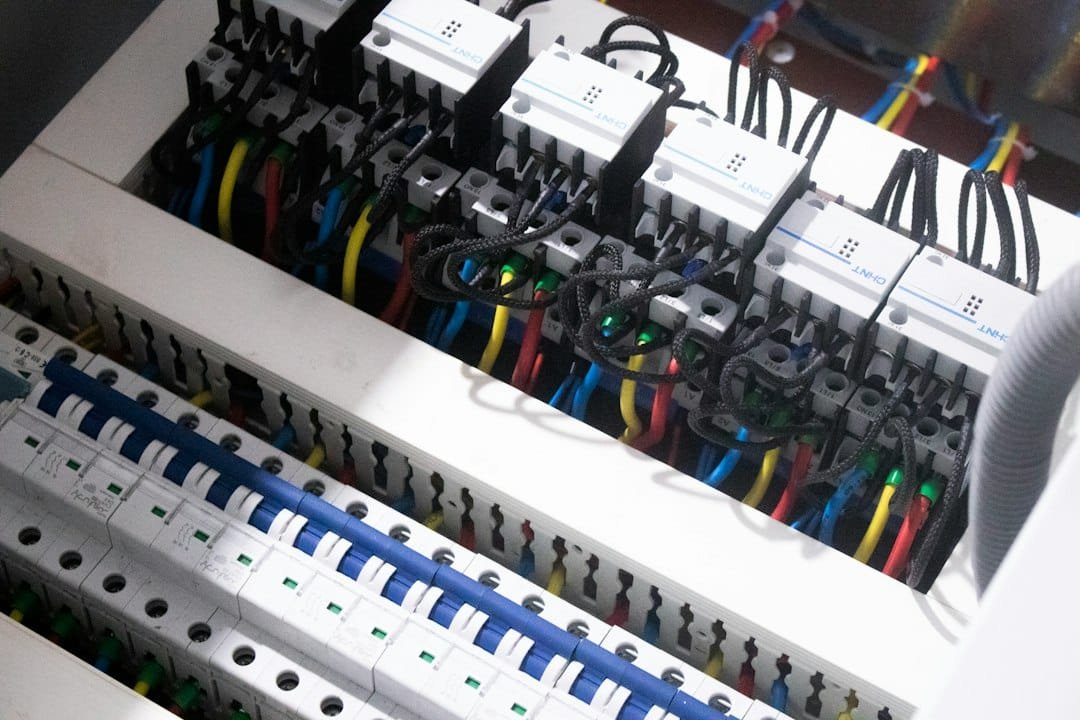
Quick answer: whole-home energy monitoring tells you what the property is using in total. Circuit-level monitoring tells you what selected breakers or loads are using. Plug-level monitoring can give you a direct reading for one compatible plug-in device.
Those methods answer different questions. A whole-home monitor is useful for seeing the total load and large patterns. Circuit sensors are better when you want to know what the HVAC, water heater, EV charger or another specific circuit is doing. A smart plug is often the simplest choice when the load is small, plug-in and safe for the plug’s rating.
Editorial scope: this guide is research-based. WesternTechy reviewed current Sense, Emporia and Schneider Electric documentation. It does not claim hands-on testing of the monitors mentioned, and it does not replace the installation instructions or electrical-code requirements for your panel.
Start with the question you want the data to answer
Energy monitoring is easiest to understand when you start with the decision you are trying to make.
Examples:
- “How much power is the house using right now?”
- “Why did our daily electricity use jump this week?”
- “How much energy does the water heater use?”
- “Is the EV charger the reason our overnight load increased?”
- “How much solar are we producing compared with what the house is using?”
- “Which circuits are worth targeting first if we want to reduce usage?”
You do not need the most detailed monitor for every question. The right architecture depends on how specific the answer needs to be.
Whole-home monitoring measures the mains
A panel-mounted whole-home monitor usually uses current sensors around the main service conductors. The monitor combines those readings with voltage information to estimate or calculate the home’s total power use. If you also need circuit control, backup priorities or automatic load management, see our Smart Electrical Panels & Load Management guide.
That gives you a top-level view of the electrical system. You can watch the total load rise when a large appliance starts, compare daytime and overnight usage, and see longer-term trends.
Sense and Emporia both use current transformers, commonly called CT sensors, for this type of monitoring. Emporia’s current Vue documentation describes main CTs for single-phase, split-phase and three-phase systems. Sense likewise uses main sensors around the service leads for whole-home measurement.
Whole-home monitoring is strong when you want the big picture. It is weaker when you need a guaranteed direct measurement of one specific branch circuit.
Whole-home device detection can be useful, but it is not the same as direct circuit measurement
Some systems try to identify individual appliances from the electrical patterns visible at the mains.
Sense, for example, uses device-detection models to identify some loads from their electrical signatures. Its current documentation also describes newer detection methods for categories such as EVs and variable-speed heat pumps.
That can be useful because you get appliance-level insights without putting a sensor on every breaker.
But an inferred device is not the same thing as a dedicated circuit measurement. Detection can take time, similar devices may be grouped, and not every appliance will necessarily be identified the way you expect.
If you need a dependable answer for one important load, direct circuit monitoring is usually easier to interpret.
Circuit-level monitoring measures selected branch circuits directly
Circuit-level monitoring adds sensors to individual branch circuits in the electrical panel.
Emporia’s current Vue 3 documentation supports up to 16 branch-circuit CTs on one monitor. Each monitored branch can be reported separately in the app.
Sense takes a different approach. Its current dedicated-circuit feature can monitor up to two specific 120V or 240V circuits when the add-on sensor port is available.
The architecture matters more than the brand example:
- whole-home monitoring measures the service total
- branch monitoring measures selected circuits directly
- device detection tries to infer individual loads from the whole-home signal
Those are related tools, but they are not interchangeable.
A circuit reading may still represent more than one appliance
A breaker label such as “Kitchen outlets” does not identify one device. That branch may serve several receptacles and several appliances.
If a circuit contains multiple loads, the circuit monitor reports their combined usage.
This is why dedicated circuits are especially useful for energy monitoring. A circuit serving only an EV charger, electric water heater or another single large load gives you a much cleaner answer.
Sense’s dedicated-circuit documentation makes this point explicitly: when multiple devices share the monitored circuit, they appear together rather than as individually measured devices.
Whole-home versus circuit-level monitoring
| Question | Whole-home monitoring | Circuit-level monitoring |
|---|---|---|
| Total house load right now | Strong | Only if mains are also monitored |
| Daily or monthly household trend | Strong | Useful for selected circuits, not necessarily the full home |
| Exact usage of one dedicated circuit | May be inferred | Strong |
| Several appliances sharing one circuit | May or may not identify them separately | Reports the circuit total |
| Find a large unidentified load | Good starting point | Useful after narrowing down which circuit matters |
| Compare HVAC, water heater and EV charging | Can show total pattern | Stronger if each has its own monitored circuit |
| Solar import/export context | Can be strong with supported solar configuration | Useful when generation or feeders are monitored correctly |
| Installation complexity | Panel work | More panel sensors and more planning |
Where plug-level monitoring fits
Plug-level monitoring is a third layer.
A compatible energy-monitoring smart plug can directly measure one plug-in load or one group of loads connected through it, subject to the plug’s electrical ratings and the equipment manufacturer’s instructions.
That makes a smart plug ideal for questions such as:
- How much does this desk setup use?
- What is the standby consumption of this entertainment cabinet?
- How much energy does this dehumidifier use over a week?
It is not an appropriate universal meter for hardwired loads, large appliances or equipment that exceeds the plug’s supported load type or rating.
See How to Measure Smart Home Energy Use Safely for watts, kWh and smart-plug limits.
Which circuits are worth monitoring first?
If you do not have enough sensors for every branch circuit, start with the loads most likely to answer a useful question.
Emporia’s current guidance suggests prioritizing high-consumption circuits such as HVAC, water heating, EV charging, dryers and ranges when deciding where branch sensors are most useful.
A sensible priority list is often:
- heating and cooling equipment
- electric water heating
- EV charging
- electric dryer
- electric range or oven
- pool or well pumps
- large workshop or server loads
- solar or battery-related feeders where supported
The best order depends on your home. Start with the circuit connected to the question you actually want answered.
Do not assume a circuit sensor gives appliance-level detail
Suppose a monitored bedroom circuit includes lights, receptacles, a computer and a television.
The circuit total tells you how much that branch is using. It does not automatically tell you how much each device contributes.
You can sometimes narrow the answer by switching loads on and off deliberately, or by adding plug-level measurement to selected devices. But the branch sensor itself measures the circuit, not the identity of every appliance connected to it.
Subpanels need their own monitoring plan
A home with a garage subpanel, workshop panel or separate distribution panel needs more planning than a single-panel home.
Emporia’s current documentation distinguishes between monitoring more circuits in the same panel and nesting a separate Vue installed in a subpanel. It warns against using branch inputs from one monitor as though they belong to an unrelated panel because that can produce incorrect totals.
The practical rule is simple: map the electrical architecture before you map the app.
If you do not understand which panel feeds which circuits, stop before installation and have a qualified electrician identify the layout.
Solar changes the meaning of the mains reading
A home with rooftop solar can have power flowing in more than one direction depending on production and household demand.
A monitoring system needs to know enough about the solar configuration to distinguish household consumption from generation and grid import or export.
Sense’s current solar documentation notes that dedicated solar sensors can provide direct production data, while some configurations can also use algorithmic solar detection. Emporia provides configuration options for solar and generation circuits so the app handles them differently from ordinary downstream loads.
Do not assume that clamping a sensor around any solar-related conductor will automatically produce a correct household total. Use the monitor’s documented solar configuration.
Battery storage adds another layer
Home batteries can charge, discharge and interact with solar, the grid and backed-up loads.
That means a simple “mains minus circuits” mental model can become misleading if the monitor is not configured around the actual topology.
If the home has solar, batteries, a generator, transfer equipment or several panels, choose a monitor that explicitly supports the architecture and follow its documented installation method.
Do not improvise sensor placement around backup or transfer equipment.
Three-phase and non-US systems need the correct configuration
Many energy-monitor examples assume a North American split-phase service, but that is not universal.
Emporia’s current documentation supports single-phase, split-phase and three-phase systems with different numbers of main CTs. Other products have their own regional and phase requirements.
Before buying, verify:
- service phase configuration
- line voltage
- main current rating
- number and size of required CT sensors
- available panel space
- regional product version
A monitor being sold online does not prove that it matches your electrical service.
Cloud dependence and data retention matter too
The electrical measurement method is only one part of the product.
Ask where the data goes and what happens without internet access.
Emporia currently states that the Vue 3 requires an active internet connection for key features and does not provide local data storage in the monitor itself. Other monitoring systems use different cloud, app and local-processing designs.
If long-term local data access matters to you, check that before installation rather than assuming every monitor stores a local history.
This belongs in the buying decision because an energy monitor can remain physically installed for years.
Do not treat a consumer monitor as your utility billing meter
A whole-home or circuit monitor can be excellent for household decisions, but do not assume its readings are legally equivalent to the revenue meter used by the electricity provider.
Accuracy specifications, sampling methods, installation quality and the intended measurement standard vary by product.
Use your utility meter and bill as the authoritative source for billing disputes unless the relevant utility or regulator says otherwise.
Panel installation is not a casual DIY job
Whole-home and circuit-level monitors are commonly installed inside the electrical panel, where hazardous energized conductors may remain present even when branch breakers are turned off.
Sense’s current installation documentation says the monitor should be installed by a qualified professional. Emporia likewise provides detailed installation requirements and directs users who are unsure about their system to a licensed electrician.
WesternTechy does not recommend learning panel work from a web article.
A safe planning process is to choose the monitoring architecture, identify the circuits you want measured, then have the installation completed or reviewed by someone qualified for the electrical work required in your jurisdiction.
A practical decision tree
If you only want the total household trend
Start with a whole-home monitor at the service mains.
If you need direct data for several large loads
Choose a system that supports branch-circuit CTs and monitor the important circuits directly.
If you need one specific plug-in appliance
Use an appropriately rated energy-monitoring smart plug if the load and manufacturer instructions allow it.
If you want every circuit
Plan sensor count, panel space, subpanels and multi-panel support before buying.
If you have solar, batteries or a generator
Choose a system with documented support for the actual power-flow architecture.
If you want local-only data
Check the product’s connectivity and storage model before installation. Do not assume panel monitoring means local storage.
A layered monitoring strategy often works best
You do not have to choose only one measurement level.
A useful setup can combine:
- whole-home mains monitoring for total load
- circuit sensors for HVAC, water heating or EV charging
- smart plugs for a few compatible plug-in devices
That gives you broad visibility without putting a sensor on every branch or expecting machine-learning detection to identify every device.
The important part is knowing which measurement generated each number.
Questions to answer before buying a panel monitor
| Question | Why it matters |
|---|---|
| What electrical service do I have? | Determines phase, voltage and main-sensor requirements. |
| Do I need total usage or specific circuits? | Determines whether mains-only monitoring is enough. |
| How many circuits matter? | Determines branch-sensor count and panel space. |
| Do I have subpanels? | May require additional monitoring hardware or nesting support. |
| Do I have solar, batteries or a generator? | Changes power flow and sensor configuration. |
| Is cloud connectivity acceptable? | Affects data access during internet or service outages. |
| Who will install it? | Panel work can expose hazardous energized equipment. |
| What decision will the data change? | Prevents buying more measurement detail than you will actually use. |
Related WesternTechy guides and tools
- Smart Home Energy & Cost hub
- How to Measure Smart Home Energy Use Safely
- Best Smart Plugs in 2026
- Kasa Smart Plug Comparison
- Smart Home Cost & Budget Calculator
- Smart Home Planning Checklist & Worksheet
Sources and editorial method
WesternTechy checked current primary documentation for the monitoring architectures and examples used in this guide.
- Sense: Dedicated Circuit Monitoring installation guide
- Sense: Using Dedicated Circuit Monitoring
- Sense: Device Detection Stages
- Emporia: CT Sensor Installation
- Emporia: Will a Vue Work for My Home?
- Emporia: Vue 3 Home Energy Monitor
- Schneider Electric: Schneider Energy Monitor
Product capabilities, cloud services and installation requirements can change. Verify the exact monitor, sensor kit, electrical service and current documentation before purchase or installation.