
A smart camera can still show live video years after its model disappears from a store. That does not tell you whether it is receiving security fixes, whether the app will keep supporting it, or when its cloud features might stop. Those are separate questions, and the difference matters before buying a used device, handing one to a tenant, or keeping an older camera on a home network.
This is a general security-maintenance advisory, not notice of a specific new breach. We checked public U.S. consumer guidance and named manufacturer policies on September 27, 2026. The dates, models and contractual terms shown by each vendor can change; look up your exact device and market before acting.
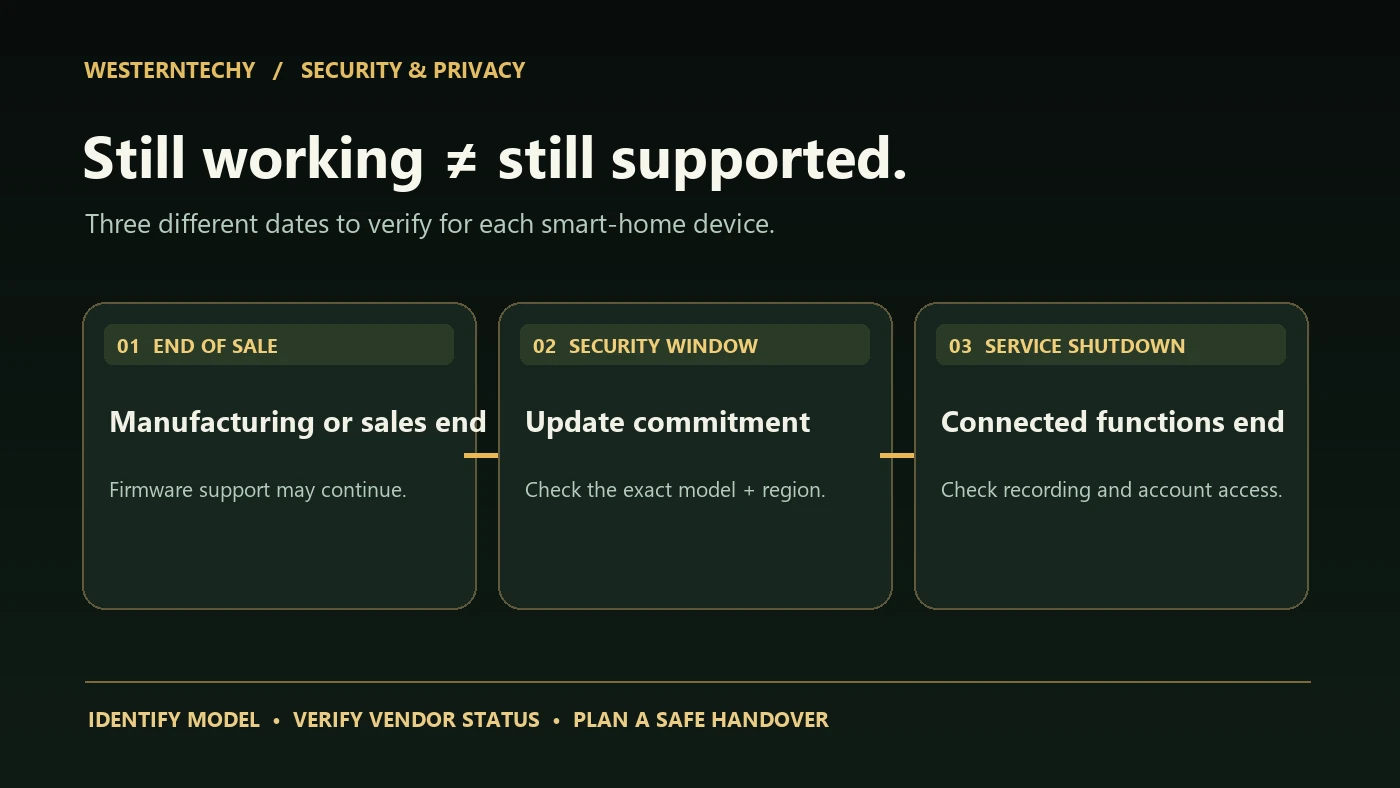
Three dates that should not be treated as the same thing
| Term you see | What it may mean | What it does not establish |
|---|---|---|
| Discontinued / end of sale / EOL | The maker stops manufacturing or selling a product or hardware revision. | That its security patches or app access ended on the same day. |
| Minimum security-update commitment | A published period through which the vendor promises security updates under stated conditions. | That every feature works forever, or that support automatically stops at the minimum date. |
| End of software or service support | Support or specific connected features end, according to the vendor’s notice and policies. | That the device can safely continue functioning offline or that saved footage and billing have been dealt with. |
| Warranty expiry | A separate product remedy or replacement period. | A firmware-update schedule or cloud-service lifetime. |
TP-Link’s U.S. end-of-life explanation, updated September 21, 2026, defines EOL principally around production of a model or revision. It notes that warranty replacement stock may change. That listing alone is not proof of a security-update cutoff. Check the model’s firmware and support information separately.
NIST’s April 2026 update to foundational IoT manufacturer guidance explicitly broadens attention to post-market maintenance, support and end-of-life communications. It is guidance for makers, not a warranty that an individual consumer device will be patched for a particular number of years.
How policies differ in practice: three documented examples
Ring: a date by product, not a generic promise for every device
Ring’s software security update policy contains model-specific minimum dates. It also explains different treatment depending on whether and where a device was bought new. For the exact date, identify the model in the Ring app or consult Software Security Updates in the account’s Control Center. The published minimum is not a guarantee that the hardware itself will last until that date.
Ring separately describes a more consequential unsupported-device state: affected devices stop connecting and their features become inoperable after a notice. Do not assume that an old Ring device will remain a useful local-only camera after a service shutdown.
Google Nest: a published minimum and a current-status column
Google’s Nest security-updates table describes at least five years of automatic security updates from the product’s first sale in the U.S. Google Store for covered connected-home devices. It also lists model-level dates and whether critical security updates are currently being received. Find the exact generation; similarly named cameras and doorbells can have different entries.
The distinction is visible in practice: Google’s August 2026 Nest security bulletin identifies patched device families and over-the-air firmware versions. A product’s software-update entry is more informative than assuming every model in the brand receives the same release at once.
TP-Link: manufacturing EOL is not itself a security-support notice
TP-Link publishes a specific EOL description and separate firmware/support pages. For a smart plug or hub, record the exact model and hardware version from its physical label, then inspect that version’s download and security notices. A product page for a newer hardware version does not prove the older version received that firmware.
A practical 20-minute support audit for the devices you own
- Identify the hardware, not just the brand. Write down the printed model and hardware revision, installation date, current firmware, app version, hub/controller and region. A renamed product may have several generations. Start with our Device Inventory & Account Transfer Tracker; store serial numbers and credentials privately, not in a shared sheet.
- Find the official support entry. Search the maker’s site for that exact model, its firmware/download page, published security-update period and any retirement notices. Record the URL and date checked. Absence from an easy-to-find list does not by itself prove that support ended; ask the manufacturer before making the claim.
- Check the complete chain. A sensor can have current firmware but depend on an old hub, phone app, router, operating system or cloud integration. Verify each item required for your actual automation rather than checking only the sensor.
- Apply legitimate updates. Use the manufacturer app or its verified download instructions. Keep stable power and network access during updates, and back up required settings. Ignore unexpected messages directing you to install a supposed firmware patch from a lookalike site.
- Test what matters. After updating, verify the actual function: lock credentials, doorbell chime, local recording, notifications, schedules and permitted household sharing. If a firmware change altered access or plan behavior, document that separately.
- Record a review and fallback. Note the next review date, who owns the account, who can remove access, and what you will do if the product or hub can no longer be supported. A camera is not an emergency alert system, and a smart lock needs an appropriate manual/key fallback.
The FTC recommends unique device passwords, two-factor authentication where offered, firmware and app updates, and disconnecting older devices you no longer use. Its connected-home guidance also emphasizes router security; the camera-specific guidance recommends considering a separate network for cameras. These measures reduce exposure, but they are not a substitute for a missing vendor security patch.
What should happen when the support date is near or has passed?
Use the vendor’s current notice to decide whether the device can still receive fixes or operate at all. A passed minimum date alone is not proof that updates have stopped; conversely, a working app is not proof of current support. Assess both information before deciding to keep, isolate, replace or retire a device.
| Situation | Practical response | Do not assume |
|---|---|---|
| Minimum update date is approaching | Check the current vendor status and support announcements; plan for a replacement if the maker confirms the end of fixes. | The product automatically fails or stops on that date. |
| Device is confirmed unpatched and still internet-connected | Review its exposure and sensitivity. Prioritize a camera, lock or main hub with remote access and arrange a supported replacement. | A new password or separate Wi-Fi network repairs an unpatched firmware flaw. |
| Vendor has announced service shutdown | Read the scope and deadline, export permitted data, plan alternative hardware and cancel or transfer subscriptions separately. | Cloud devices retain useful local-only operation. |
| Old device is being donated, sold or left for a tenant | Follow the manufacturer’s account-release procedure, remove shared users and stored data, and verify ownership handoff. | A factory reset alone revokes cloud tokens, subscriptions or all stored backups. |
Retirement is a lifecycle decision, not an accusation that a particular product is compromised. If it cannot be safely maintained for the role it plays in your home, stop relying on it for a security-critical job. Follow the vendor’s responsible disposal or recycling guidance; do not discard a device that still contains storage or credentials.
Does a separate IoT network make an unsupported camera safe?
A separate or guest network can limit some pathways between devices when configured correctly. It does not patch the camera’s firmware, revoke stolen account access, guarantee local recording, or block all outbound vendor traffic. Use segmentation as one defense alongside supported updates, minimal privileges, MFA and account reviews—not as permission to ignore a maker’s end-of-support notice.
Our network troubleshooting Guide explains why guest isolation can also interrupt legitimate Matter, Thread or local-device discovery. Test your normal viewing and automations after a network change before depending on them.
Five questions to ask before buying a new or refurbished smart device
- What is the exact model and hardware revision, and where does the manufacturer publish its security-update policy?
- What is the minimum update period for this particular version in my region, and is it currently receiving fixes?
- Does it rely on an extra hub, cloud service, paid recording plan or phone operating system? What are those products’ support terms?
- Can I export recordings or ownership information, transfer the device to another account and remove shared users without leaving old access behind?
- What happens during an internet or service outage, and which functions remain available locally under the maker’s published documentation?
A low upfront price has little value if the exact device’s support status is unclear and you need it to control entry, record a front door or handle household data. A vendor’s published security window is a maintenance input, not a score for image quality or a promise that every future feature will arrive.
Keep a private support record
| Field | What to record |
|---|---|
| Device, version and role | Exact printed model, hardware revision, camera/hub/lock role. |
| Account and integration | Primary owner, authorized shared users, app, hub and dependent service; never write passwords in a shared record. |
| Evidence of support | Official policy URL, current update status and date checked. |
| Firmware and app | Installed versions and last verified update. |
| Replacement condition | Confirmed support end, announced service shutdown, failure of required function, or unacceptable exposure. |
| Next review and handover | Owner of the task, inspection date and verified account-release process. |
For a security camera, the installation and privacy acceptance test covers recording and account controls; our access and ownership Guide covers shared users and move-out. A good maintenance plan ties those tasks to the exact device’s support policy.
Source notes and editorial method
Sources checked September 27, 2026: this article compares publicly available manufacturer support statements and U.S. consumer-security guidance. It does not claim physical testing, an independently verified vulnerability in any named product, or a universal support duration. Published dates can vary by generation, seller and region; readers must check the applicable live notice.
- NIST, April 2026: revised IoT manufacturer guidance covering post-market support and end-of-life communications.
- FTC: securing internet-connected devices at home. FTC: securing home security cameras.
- Ring: product-specific security-update commitments. Ring: effects of an unsupported-device state.
- Google Nest: security-update commitments and model status. August 2026 Nest security bulletin.
- TP-Link: definition of end-of-life products and hardware revisions.
Bottom line: look for the specific device’s published support status, not just whether it still turns on. Keep supported firmware, accounts and networks maintained; plan replacement or verified handover if the maker confirms that necessary security updates or connected functions will end.